Everything from the talk in one place. First, what the key AI ideas mean in plain English. Then two copy-and-paste prompts that help you pick your first AI hire. About an hour, using the AI assistant you already have.
Nyssa WatersCEO and Co-Founder, Possibl
If you remember five things
Five lines worth stealing
01Hire AI like staff.Job description, probation, KPI.
02One brain is not enough.Route each job to the right model.
03Models are rented. Context is owned.How your business works is the asset.
04Test the boring one first.Boring is where the money is.
05AI drafts, people decide.A person signs off, every time.
Part 1Understand
AI explained simply
How an AI agent gets work done
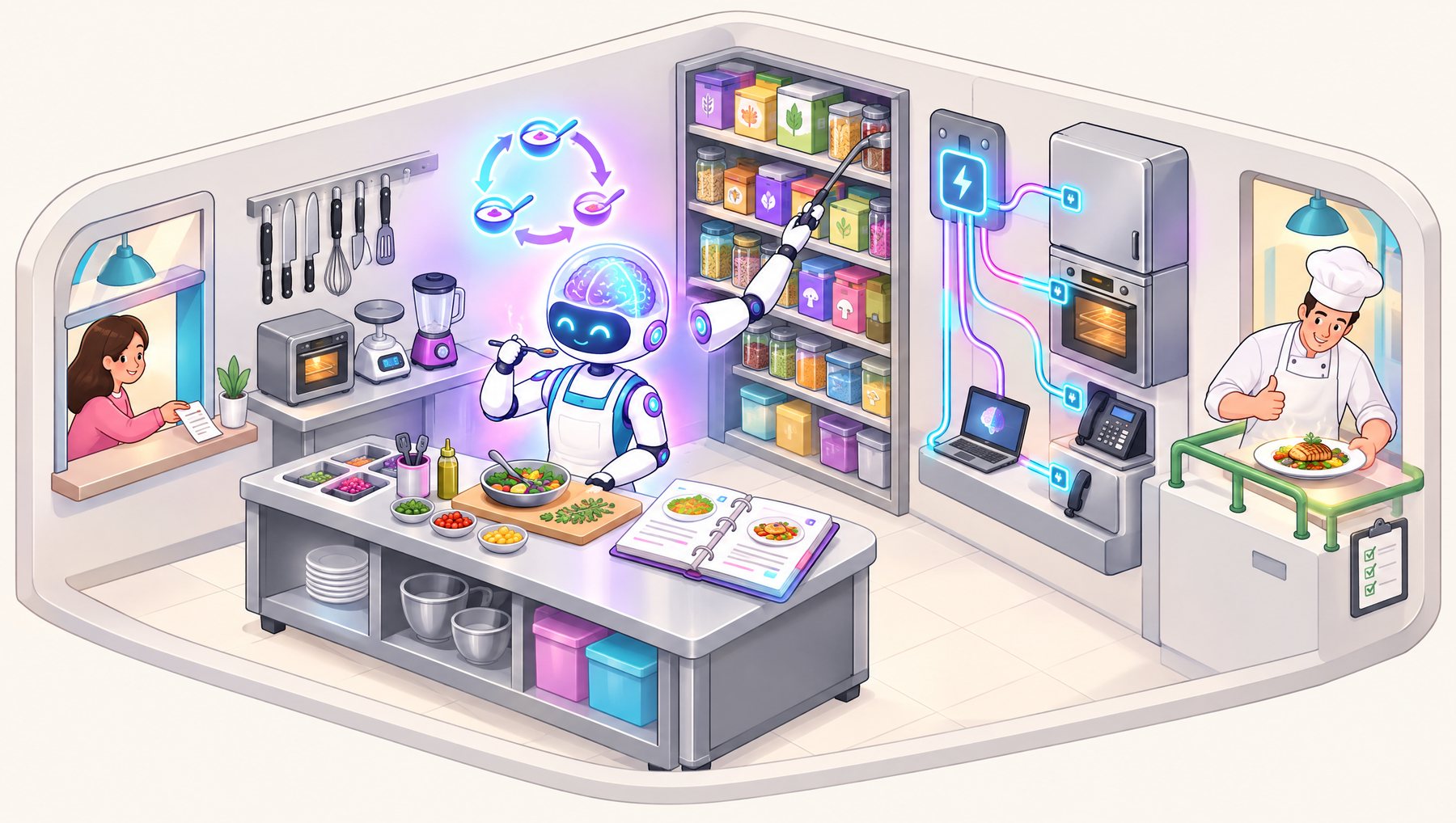
Picture a restaurant kitchen. A customer places an order, a very clever chef cooks it with the right tools and recipes, and the head chef checks every plate before it goes out. That's a good way to picture how an AI agent works.
Swipe to explore the kitchen →
Left to right: the order comes in, the robot chef works with its tools, recipes and pantry, and the head chef checks the plate before it leaves.
The recipe for an agentLLM brain+harness+tools & MCP+skills & memory+a loop+a human checking
LLM
Large Language Model
KitchenThe chef's brain. It has read millions of cookbooks, so it knows how food usually goes together.
ReallyThe AI that reads and writes by predicting the next word. Very smart, but on its own it can only think and talk, not do.
Prompt & context
The instructions
KitchenThe order ticket, plus notes like "table 4 is vegetarian".
ReallyWhat you ask the AI to do and the background it needs for this job. A clear order gets a better meal.
Agent harness
The kitchen itself
KitchenThe benches, order rail and house rules that turn a clever brain into a working chef.
ReallyThe software wrapped around the LLM. It hands over tools, memory and rules, and keeps the AI working until the job is finished.
Tools
Things it can do
KitchenKnives, the oven, the scales. Without them the chef can only describe dinner.
ReallyActions the AI can take: search the web, send an email, update a spreadsheet, look up a customer.
MCP
Model Context Protocol
KitchenOne universal plug, so any appliance works in any kitchen.
ReallyA shared standard for connecting AI to apps like email, accounting or your CRM. Build the connection once and any agent that supports MCP can use it.
Skills
Saved know-how
KitchenThe binder of recipe cards. The chef pulls out only the card for tonight's dish.
ReallyStep-by-step instructions for a task, such as "how we write a proposal", so the AI does it your way every time.
Memory & RAG
Retrieval-Augmented Generation
KitchenThe pantry. Real ingredients, fetched before cooking instead of guessing.
ReallyIt looks things up in your own documents before answering, so answers are grounded in your facts (still check the important ones). Memory lets it remember what happened last time.
Loop engineering
Taste, adjust, repeat
KitchenTaste the sauce, add salt, taste again, until it is right.
ReallyThe agent plans, acts, checks the result and fixes it, over and over. Designing when it checks and stops makes it reliable.
Human in the loop
Plus guardrails
KitchenThe head chef checks each plate, and there are rules like "no nuts for table 4".
ReallyPeople approve the big steps, like paying a bill or emailing a client. Guardrails help stop the AI doing things it shouldn't.
1 / 9 · swipe for more
One brain is not enough
You wouldn't hire one person for every job. Match each job to the right kind of AI brain, at the right cost.
Fast
Volume work: sorting the inbox, first drafts, simple replies. Costs cents per hundred tasks.
Inbox triage · first-draft quotes
Deep
Careful thinking: tenders, pricing edge cases, contracts. Worth paying for where mistakes cost.
Tender responses · contract checks
Eyes and ears
Reads what comes in from site: photos, voice notes, plans and scanned documents.
Site photos · voice notes from the van
What the kitchen serves at work
Quotes
Drafts a quote from job notes and your pricing history. Your estimator checks, adjusts and sends.
Customer inbox
Sorts overnight emails, finds answers in your policies, and drafts replies for a person to approve.
Follow-ups
Never forgets day two. Drafts a chase for every open quote and overdue invoice.
Monday report
Turns job data into a short summary by 7am, so there are fewer surprises at month-end.
Part 2Do
The plan
Your first AI hire in four steps
You don't need to buy anything to start. Steps 1 and 2 take about an hour with the two prompts below. Steps 3 and 4 are a 30-day trial, run the way you'd trial a new staff member.
Week 1, time the process as it is. Week 2, the agent starts, with a person checking every output.
Weeks 1 to 4
Step 4
Review on day 30
Compare the same numbers as week 1. Scale it, adjust it, or stop. Stopping is a win too.
Day 30
What to use
The AI assistant you already have: ChatGPT, Claude, Microsoft Copilot or Gemini all work for steps 1 and 2.
A business or paid account, so you control how your information is used.
A document or notes app to save your context pack. You'll reuse it every time.
Before you paste
Check the setting that stops your chats being used to train the AI.
Leave out customer names, contact details, bank details and passwords. Use "Customer A" instead.
AI drafts, people decide. Nothing goes to a customer without a person checking it.
Step 1 · Build your context pack
Models are rented. Context is owned.
An AI agent is only as good as what it knows about your business. Without your context it works like a first-shift trainee. With it, it works more like your best person on a good day. This step gets how you actually work out of your head and onto paper.
Option A: you have documents
Attach your SOPs, checklists, price lists, templates, or a few example quotes and emails, then paste Prompt 1. The AI reads them and asks only about the gaps.
Option B: it's all in your head
Paste Prompt 1 with nothing attached and the AI interviews you one question at a time. Or answer the question bank in your own time and paste your answers in.
Prompt 1 · Context pack builder
You are helping me, the owner of a small business, build a "context pack": a clear written record of how my business actually works, so that an AI agent could later help with part of it.

About my business: [one or two lines: what we do, how many staff, where we work]

How we will work together:

1. If I have attached documents (SOPs, checklists, templates, price lists, example quotes or emails), read them first. Then give me a short list of what they cover and what is missing.

2. Interview me to fill the gaps. Ask ONE question at a time, in plain English, and wait for my answer. If an answer is vague, ask me for a real example from the last month. Keep going until you understand each main process from start to finish.

3. Cover these areas:
   - What we sell, who buys it, and how busy we are
   - Our main processes: how work comes in, quoting or pricing, booking and scheduling, doing the work, invoicing and getting paid, follow-ups, reporting and admin
   - For each process: what starts it, the steps, who does it, the tools or systems used, how long it takes, how often it happens, and where it goes wrong
   - Our pricing and discount rules, and when we say no to a job
   - How we talk to customers (our tone of voice)
   - The decisions we make and the rules of thumb behind them
   - Anything AI must never do (privacy, safety, compliance, promises to customers)

4. Do not give me advice or suggest AI tools yet. Just capture how things work today.

5. When I type "done", write up my context pack using these headings:
   - Business snapshot
   - Process list (a table: process, owner, how often, hours per week, tools, main pain)
   - One section per process: trigger, steps, decision rules, systems, what good looks like, common mistakes
   - Pricing and decision rules
   - Tone of voice, with 3 example phrases we actually use
   - Risks and things AI must never do
   - Gaps to document next

Use New Zealand English. Keep it practical and plain. Start by asking your first question.
Option B · Question bank to answer in your own time
Here are my answers about how my business works. Turn them into my context pack using these headings: Business snapshot; Process list (table: process, owner, how often, hours per week, tools, main pain); one section per process (trigger, steps, decision rules, systems, what good looks like, common mistakes); Pricing and decision rules; Tone of voice; Risks and things AI must never do; Gaps to document next. Then ask me about anything that is unclear. Use New Zealand English.

THE BUSINESS
1. What do we sell, and who are our typical customers?
2. How many people work here, and who does what?
3. What does a busy week look like compared with a quiet one?

WHERE THE TIME GOES
4. Which tasks eat the most hours each week? Roughly how many hours each?
5. Which jobs do we do over and over, the same way every time?
6. What admin do people put off or dread?
7. If you had an extra pair of hands tomorrow, what would you give them first?

HOW WORK COMES IN
8. How do new enquiries arrive (phone, email, website, referrals)?
9. What happens next, step by step, and who does it?
10. How quickly do we usually respond? Do we ever lose work by being slow?

QUOTING AND PRICING
11. Walk through how a quote gets built, from first contact to sending it.
12. What information do you need before you can price a job?
13. How do you decide the price? What rules of thumb do you use?
14. When do you discount, and when do you walk away from a job?
15. How long does a typical quote take, and how many do we send each month?
16. How often do quotes need fixing or redoing, and why?

DOING THE WORK
17. Once a job is won, what are the steps to deliver it?
18. What checklists, templates or forms do we use?
19. Where do mistakes or rework usually happen?

GETTING PAID AND FOLLOWING UP
20. How do we invoice, and how long do customers take to pay?
21. How do we chase open quotes and overdue invoices? Who does it?
22. What falls through the cracks when we get busy?

CUSTOMERS AND TONE
23. How do we like to talk to customers? Give three phrases we actually use.
24. What questions do customers ask again and again?
25. What would upset a customer most if we got it wrong?

SYSTEMS AND INFORMATION
26. Which software and tools do we use (accounting, job management, email, spreadsheets)?
27. Where does important information live, and what is only in someone's head?
28. Which reports do we look at, and how often?

RISK AND RULES
29. What must never go to a customer without a person checking it?
30. Is there information AI should never see (customer details, pricing, contracts)?
31. Are there industry rules, health and safety or compliance steps we must follow?
32. If one person left tomorrow, what knowledge would we lose?

MY ANSWERS:
[Type your answers under each number, then paste this whole block into your AI tool]
Tip: save the finished context pack. It's the most valuable thing you'll make in this process.
Step 2 · Pick one process
Test the boring one first
Run every process through these seven tests before you spend a dollar. Prompt 2 does the scoring for you, using your context pack.
01
PainDoes it hurt every week?
02
FrequencyOften enough to pay back the effort?
03
ValueCan you put a dollar figure on the leak?
04
RiskIf it's wrong, is the damage small and reversible?
05
ReadinessCan you document the process?
06
OwnerOne named person, not a committee?
07
MeasurementWill you know in numbers, in 30 days?
6 or 7 yeses: hire for that job4 or 5: fix the gaps first3 or fewer: park it
Prompt 2 · Pick your first AI hire
Using my context pack (above in this chat, or pasted below), help me choose ONE process to hand to a first AI agent. I want a small, safe, measurable start.

Our average cost per staff hour is about: [$__ per hour]

1. List every process from the context pack as a candidate (up to 10).

2. Score each one against these seven tests. Answer yes or no, with a one-line reason:
   - Pain: does it hurt every week?
   - Frequency: does it happen often enough to pay back the effort?
   - Value: can we put a dollar figure on the leak? Estimate hours per month multiplied by our hourly cost.
   - Risk: if the AI gets it wrong, is the damage small and reversible? Can a person check every output before it reaches a customer?
   - Readiness: is the process documented well enough in the context pack?
   - Owner: is there one named person who will own it (not a committee)?
   - Measurement: will we see a change in the numbers within 30 days?

3. Show the results as a table: process, the seven scores, total out of 7, and estimated value per month.

4. Apply these rules:
   - 6 or 7 yeses: a good first hire
   - 4 or 5: fix the gaps first, and tell me what the gaps are
   - 3 or fewer: park it for now
   - Prefer the boring, measurable job over the exciting one
   - Anything that talks directly to customers on day one scores "no" on Risk, unless a person approves every message

5. Recommend the single best candidate and write its job description:
   - The job, in one sentence
   - What it does, and what it must never do
   - The context it needs from our context pack
   - The kind of AI it needs: fast (volume work), deep (careful checking) or eyes and ears (photos, voice notes, documents)
   - The systems it needs access to (read-only to start)
   - Where a person signs off
   - The KPIs, and what to measure in week 1 as the baseline

6. Write a 30-day probation plan:
   - Week 1: change nothing, time and document the process as it is
   - Week 2: the agent starts, with a person checking every output
   - Weeks 3 and 4: run it and measure the same numbers as week 1
   - Day 30: review, then scale it, adjust it or stop

7. Finish with the three questions I need to answer before we start.

Use New Zealand English and plain language. No jargon.
You're ready for step 3 when you have
One processScored 6 or 7 out of 7, and boring enough to measure.
A job descriptionWhat the agent does, what it never does, and where a person signs off.
One ownerA named person who runs the 30-day probation.
A baselineHours, turnaround, error rate or follow-up coverage, timed in week 1.
Want a hand with week 1?
Let's spend a day on yours
The Possibilities Day is a half-day working session at your business, with your team. You leave with a prioritised 90-day AI roadmap. Not a quote for software.
Hour 1Map the workDocument how things really run.
Hour 2Price the leaksEvery bottleneck gets a dollar figure.
Hour 3Score the ideasEvery idea through the seven tests.
Hour 4Build the roadmapFirst hire, brains, context pack, owner, KPIs.